


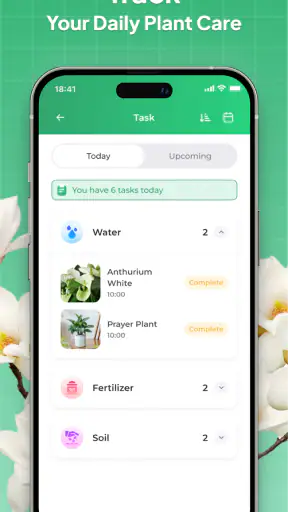
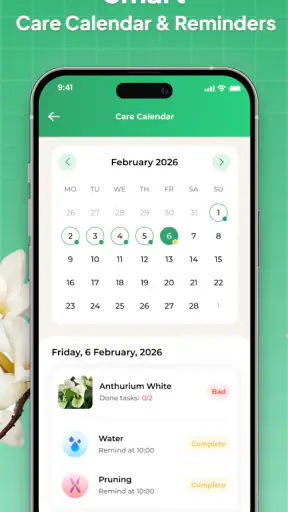
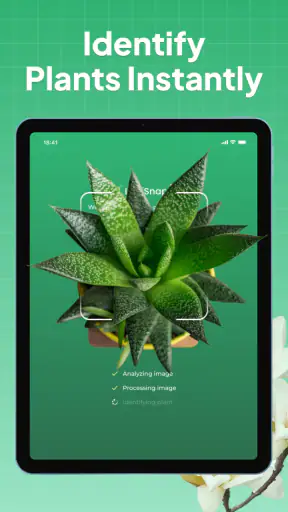
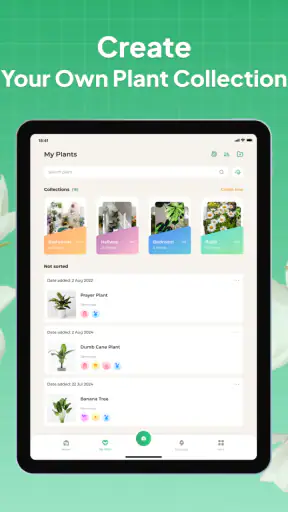
I opened Plant Identifier: LeafSnap by Appixi with a simple question: could it turn a plant I did not recognize into a useful next step, rather than just a name on a screen? That is the right way to judge this Education app. Its purpose is not limited to collecting plant names; it also brings together identification, basic plant care, and disease diagnosis in one mobile workflow. In everyday use, that combination is more valuable than a botanical label alone, although it still needs a careful user behind it.
The app is free to start, carries an Everyone age rating, and has become a widely used option, with over five million installs. Its average score is 4.4 from around fourteen thousand ratings, alongside roughly two thousand seven hundred written reviews. Those figures suggest that LeafSnap is approachable for casual users, but they do not remove the need to check an identification before acting on it. I found it most useful as a first filter: it helps me decide what I may be looking at and what information I should verify next.
From an Unfamiliar Leaf to a Practical Decision
Starting with the right photograph
The quality of the result begins before the app does any analysis. When I point my phone at a crowded flowerbed, the visual input contains too much competing information: several leaves, stems crossing one another, soil, shadows, and sometimes flowers from different plants. A cleaner photograph gives LeafSnap a better chance to focus on the subject. I get more useful results when the plant fills most of the frame and the leaf or flower is easy to distinguish from its background.
This is an important distinction between using the app thoughtfully and treating it like a magic camera. A single leaf can be enough to start, but a leaf may not show the features that separate two similar species. If possible, I would capture the leaf, the whole plant, and a close view of the flower, bark, or fruit in separate attempts. That creates a small visual record rather than forcing one image to answer every botanical question.
Lighting matters too. Direct glare can wash out surface details, while deep shade can make green tones and leaf edges difficult to read. I prefer soft daylight and a steady hand. If the plant is moving in wind, waiting a moment is usually more useful than taking several blurred pictures. These are simple habits, but they are among the most effective ways to improve the handoff from the real plant to the app.
Moving through identification
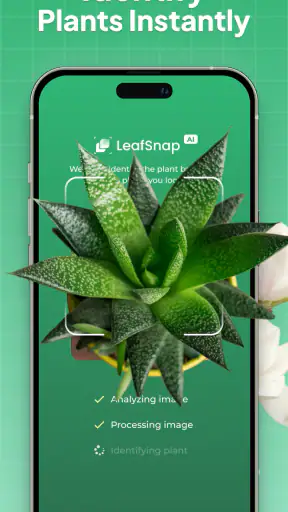
Once I have a suitable image, the appeal of LeafSnap is its short path from observation to a possible answer. I do not need to begin with botanical vocabulary or know whether I am looking at a shrub, herb, or tree. That makes it friendly for a beginner who has found an unfamiliar plant on a walk, in a garden, or in a houseplant collection.
The result is best treated as a suggestion to investigate, not as permission to eat, touch, prune, or treat the plant immediately. Visual identification has natural limits, especially when a plant is young, damaged, out of season, or photographed without its most distinctive parts. I use the proposed name as a search key for the next stage of my decision-making. That mindset prevents the most serious mistake: confusing a convenient result with expert confirmation.
For a child doing a school project, the app can make the first encounter with a plant more engaging. For an adult caring for a garden, it can reduce the time spent narrowing down possibilities. The same workflow serves both users, but the level of checking should differ. A curious learner may only need a plausible starting point, while someone dealing with a potentially toxic species or a serious crop problem should verify the result elsewhere before taking action.
Turning a name into care
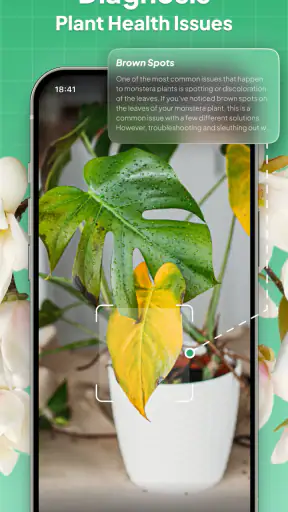
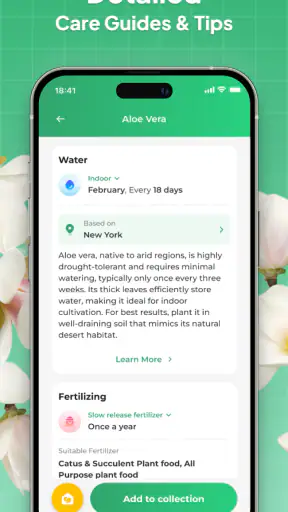
Identification becomes genuinely useful when it changes what I do next. LeafSnap’s plant-care angle helps connect the visual question with maintenance. Instead of stopping at “what is this?”, I can move toward “what should I watch?” and “what might explain the way it looks?” That is a better workflow for a houseplant whose leaves are yellowing or a garden plant that has suddenly developed spots.
I find it helpful to separate diagnosis from treatment. First, I photograph the affected area and the plant as a whole. Then I compare the suggested condition with the visible pattern: are the marks limited to older leaves, concentrated along edges, or spreading across new growth? Is the entire plant stressed, or is one section affected? This prevents me from applying a remedy simply because a disease label sounds convincing.
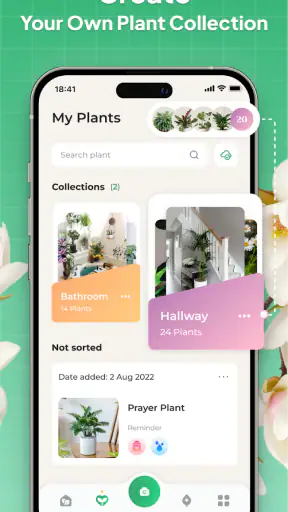
A practical tip is to keep the original photograph instead of relying only on the app’s result. If the plant changes over several days, the earlier image becomes a useful comparison point. LeafSnap can begin the record, but my own dated photos and notes provide the continuity. That is a small but important trade-off: the app is quick at the moment of inspection, while a real care decision often depends on change over time.
Handling the handoffs between people and tools
The most realistic use of this app is not isolated. I might identify a plant at a friend’s home, send the suggested name to the owner, and then help compare its care needs with the conditions in that room. In a garden, I could use it to create a shortlist before asking a nursery worker about soil, light, or seasonal pruning. The app handles the first recognition step; another person or reference source may handle the final decision.
This handoff is also where careful wording matters. I would share the image and the candidate name, not present the answer as an unquestionable fact. If a plant is near pets or children, I would make safety verification a separate task. LeafSnap’s Everyone rating describes the app’s general suitability, not the safety of every plant it may identify. That distinction is easy to miss and worth keeping in mind.
For a school assignment, I would use the app to generate a starting identification, then ask the student to compare leaf shape, arrangement, habitat, and flowering details with a trusted book or educational source. This turns the app from an answer machine into a learning aid. It also teaches a useful scientific habit: observations support a conclusion, but a conclusion should remain open to correction.
A realistic everyday workflow
Imagine finding a plant in a shared courtyard with pale patches on several leaves. My workflow would begin with a wide image showing the plant’s overall condition, followed by close photographs of healthy and damaged leaves. I would run the clearest image through LeafSnap, note the likely identity, and then use the care and diagnosis information to form questions rather than jump straight to a product or treatment.
Next, I would check the plant’s location. Is it receiving less light than usual? Has watering changed? Could another plant be touching it? Have the damaged leaves been exposed to cold, dust, or physical rubbing? These checks matter because visual symptoms can have several causes. The app can help narrow the conversation, but it cannot replace observing the plant’s environment.
The outcome I want from that session is not merely a name. I want a short action plan: isolate the plant if necessary, adjust one care factor at a time, photograph it again later, and seek a second opinion if the condition worsens. LeafSnap fits well at the beginning of that plan because it reduces uncertainty quickly. It is less suitable as the only authority for a high-stakes diagnosis.
Where the flow breaks
The first weak point is ambiguity. Plants often look different depending on age, season, light, pruning, or stress. A photograph of one leaf may not contain enough information to separate close relatives. Flowers, fruit, bark, and growth habit can be more informative than a leaf alone, so users who never provide those details may receive a less dependable starting point.
The second weak point is the gap between identification and care. Knowing a species does not automatically reveal what is wrong with an individual plant. Two plants of the same kind can suffer from different watering, light, pest, or soil problems. I would therefore avoid treating the care section as a fixed prescription. It is more useful as a checklist that helps me investigate the plant’s surroundings.
The third issue is the pricing model. LeafSnap is free, but optional in-app purchases range from $1.99 to $49.99 per item. That broad range means I would pay attention during setup and before confirming anything, especially if I only need occasional identification. A frequent gardener may find extra access worthwhile, while a casual user should first decide whether the free experience already covers the intended task.
There is also a practical reason not to depend on it for professional work. A landscaper, botanist, nursery employee, or researcher may need a traceable identification process, detailed references, and confidence based on multiple physical characteristics. LeafSnap is designed for a phone-based consumer workflow, so I see it as a convenient assistant rather than a replacement for specialist knowledge.
Who will get the most from it
I would recommend LeafSnap to beginners who want a less intimidating way into plant recognition. It is especially handy for people who regularly encounter unknown plants but do not want to carry a field guide everywhere. Gardeners can use it to organize their first questions, parents can use it to encourage observation outdoors, and houseplant owners can use it when a familiar plant begins to look unfamiliar.
It also suits users who prefer a connected workflow. The same app experience can take a person from a photograph to a likely identity and then toward care or disease-related guidance. That is more convenient than switching immediately between a camera search, a general web search, and several separate gardening tools. The benefit is not that every answer is perfect; it is that the first investigation is quicker and more focused.
I would skip it as my main tool if I needed guaranteed species-level certainty, formal botanical documentation, or a definitive diagnosis before making a safety-sensitive decision. In those situations, a local expert or a specialized reference is the better choice. I would also hesitate if I only wanted a simple visual search and did not care about care guidance, because a general image-search service may be faster for that narrower job.
How it compares with familiar alternatives
Compared with a printed field guide, LeafSnap is faster to consult and easier for someone who does not know where to begin. A book still has an advantage when I want to compare many similar species side by side or learn the identifying structure behind an answer. The app gives convenience; the guide gives a slower, more deliberate way to build knowledge.
Compared with a general image-search tool, LeafSnap feels more focused on the plant-care journey. A broad search may return a large mixture of images, shopping pages, and loosely related results. LeafSnap’s value is the attempt to keep the user within a plant-specific path. The trade-off is that a general search can sometimes provide more varied visual comparisons when the original image is unusual.
Compared with asking a gardening community, the app is immediate and private. A community can benefit from several human opinions and may notice details the camera misses, but it takes time and the quality of replies can vary. I would use LeafSnap first, then involve an experienced person when the result affects a valuable plant, a shared garden, or a possible safety concern.
What to know before installing
LeafSnap is currently at version 2.8.6 and works on Android devices running version 7.0 or later. That makes compatibility worth checking before downloading on an older phone. Since it is free to install but includes optional purchases, I would also decide in advance whether I am testing it casually or planning to use it as a regular gardening companion.
The developer is Appixi, and the app has been available since November 7, 2019. Its long presence and substantial user base make it feel like an established consumer tool rather than a brand-new experiment. Still, popularity should not change how I handle uncertain results. A familiar interface can make an answer feel more certain than the photograph deserves.
My best advice is to prepare the input, capture more than one useful view, and keep the identification separate from the final decision. Use the app to reduce the search area, then confirm important details through observation, a reliable reference, or a knowledgeable person. That workflow gets more value from LeafSnap without asking it to do a job it was never meant to do.
My final take
After using it as a complete path from photograph to care question, I see Plant Identifier: LeafSnap as a practical first stop for curious plant owners. Its strongest quality is the way it joins recognition with the next questions a beginner usually has. Instead of leaving me with a label, it encourages a more useful investigation into care and visible problems.
Its limitations are just as clear: image quality affects the starting point, similar plants can remain difficult, and diagnosis should not be confused with certainty. The optional purchases also deserve attention from anyone who wants more than occasional use. For casual discovery, school learning, garden preparation, and early houseplant troubleshooting, I would recommend trying it. For toxicology, professional identification, or serious plant loss, I would use it only as one step in a broader process.
My honest recommendation: install it if you want a friendly way to turn an unknown plant into a shortlist of sensible next actions. Take clear photos, question the result, and let the app support your judgment rather than replace it. Used that way, LeafSnap earns its place in a gardener’s phone without pretending that every leaf can tell its whole story.


